
Tips for Creating a Productive Home Workspace
pojajii >> Productivity>> Tips for Creating a Productive Home Workspace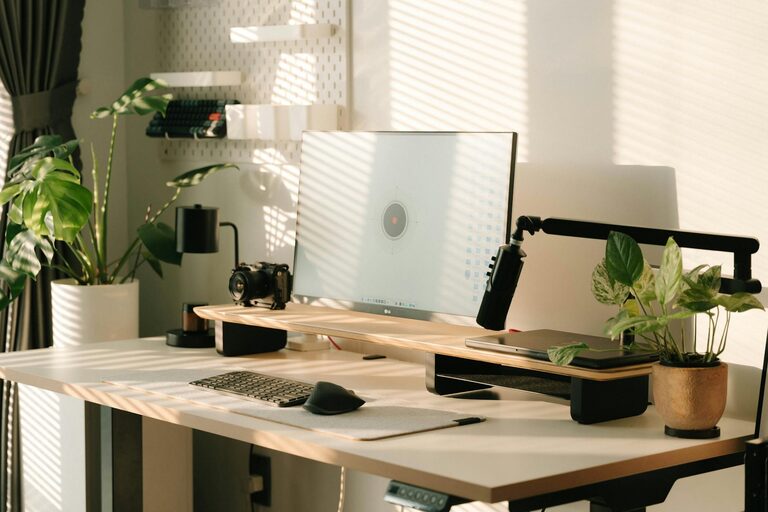
Tips for Creating a Productive Home Workspace
Creating a productive home workspace is essential for anyone working or studying from home. A well-designed environment can help you focus better, reduce distractions, and maintain a healthy work-life balance. Whether you have a dedicated room or just a small corner, these tips will guide you in setting up a workspace that meets your needs and enhances your productivity.
Choose the Right Location
The first step in creating a productive workspace is selecting the ideal spot in your home. Consider the following:
– Natural Light: Try to work near a window. Natural light can improve mood and energy levels.
– Quiet Area: Pick a space away from high-traffic zones where noise and interruptions are minimal.
– Space Availability: Ensure there is enough room for your desk, chair, and necessary equipment without feeling cramped.
If space is limited, try to designate a specific area as your work zone, even if it’s just a small section of the living room or bedroom.
Invest in Ergonomic Furniture
Comfort plays a vital role in maintaining productivity. Poor posture can lead to discomfort and long-term health issues.
– Ergonomic Chair: Choose a chair that supports your lower back and allows you to sit with feet flat on the floor.
– Adjustable Desk: If possible, use a desk with adjustable height to switch between sitting and standing positions.
– Monitor Placement: Position your computer screen at eye level to avoid neck strain.
– Keyboard and Mouse: Use external peripherals that encourage a natural hand and wrist position.
Spending a little extra on ergonomic furniture can pay off in comfort and focus throughout the day.
Keep Your Workspace Organized
Clutter can distract you and reduce productivity. A tidy workspace helps keep your mind clear and task-focused.
– Declutter Regularly: Remove unnecessary items to maintain a clean area.
– Use Storage Solutions: Shelves, drawers, and organizers keep supplies and documents in order.
– Cable Management: Use clips or ties to keep cables untangled and out of the way.
– Minimal Decor: Personalize your space with a few meaningful items but avoid overcrowding.
An organized workspace makes it easier to find what you need and reduces stress.
Personalize Your Environment
While organization is key, personal touches can make your workspace inviting and motivating.
– Plants: Adding a small plant can improve air quality and bring a calming element.
– Artwork: Hang inspiring artwork or photos that boost your mood.
– Color Scheme: Choose colors that energize or soothe you, based on your preferences.
Balancing professionalism with comfort helps you feel at ease and engaged.
Establish a Work Routine
Your workspace is only as productive as your habits. Creating a consistent routine reinforces focus and efficiency.
– Set Working Hours: Define clear start and end times to keep work from spilling into personal time.
– Take Regular Breaks: Short breaks every hour can reduce eye strain and refresh your mind.
– Dedicated Work Attire: Dressing for work can help shift your mindset into productivity mode.
– Limit Distractions: Turn off non-essential notifications and keep your phone away if possible.
A structured approach helps maintain discipline when working remotely.
Optimize Technology and Tools
Having the right tools ensures smooth workflow and reduces frustration.
– Reliable Internet: A stable connection is essential for virtual meetings and online tasks.
– Quality Headphones: These can help minimize noise and improve focus during calls.
– Task Management Apps: Use digital tools like calendars and to-do lists to stay organized.
– Backup Solutions: Regularly save your work and consider cloud backups to prevent data loss.
Keeping your tech updated and functional supports efficient work.
Prioritize Good Lighting
In addition to natural light, adequate artificial lighting is important.
– Desk Lamps: Adjustable lamps provide focused lighting without glare.
– Warm Light: Choose bulbs with a soft white or warm tone to reduce eye fatigue.
– Even Illumination: Avoid harsh contrasts between screen brightness and surrounding lighting.
Proper lighting setup reduces headaches and enhances concentration.
Maintain Work-Life Balance
A productive workspace also means respecting boundaries.
– End-of-Day Ritual: Clear your desk and shut down your computer to signal the end of work.
– Separate Work and Leisure: Avoid working in areas used for relaxation to prevent overlap.
– Communicate Boundaries: Let family or housemates know your work hours to minimize interruptions.
Balancing work and personal life contributes to long-term productivity and well-being.
—
By thoughtfully designing your home workspace with these tips in mind, you can create an environment that supports your focus, comfort, and efficiency. Remember, the goal is to make your workspace work for you. Adapt these suggestions to fit your unique needs and enjoy a more productive day at home.